
Plan it. Post it. Promote it.
Write your post once and share it to all your Skool communities, with clean formatting, in your voice and the right category every time.
Free plan included. No credit card needed.
Everything you need to show up on Skool and be authentically you
Flight Plan sits right beside Skool in Chrome, or you can open it as its own page. Sharing, following up and finding promotion opportunities all happen in one easy place.
Write once, share everywhere
Choose your communities and Flight Plan fills in each one with your post and its category.
Formatting that comes through
Paste from Word, Google Docs or your favorite AI software. Your bold, italic and lists arrive clean.
My Spaces
Every community you promote in, saved with its category, promo days and rules, and sorted into Promo and Non-promo communities. Each day your Dashboard shows you exactly where you can promote, based on your rules.
Notifications, sorted by type
Stay on top of every notification without giving up hours of your day to the Skool bell. Search any box by name or subject.
Tasks and follow ups
Turn any notification into a task, track it on a board and get a reminder.
Daily routine
A simple daily checklist that keeps your Skool habit on track.
Message templates
Save the replies and welcome messages you send most, so every DM is ready when you are.
Calendar PRO
See every scheduled post at a glance and plan your week of promotion ahead.
Activity history
A record of what you shared, where and when, with likes and comments on Pro.
Write once. Share everywhere. Celebrate. 🎉
Choose your communities, click Share, and Flight Plan fills in each one with your post and its category. Click POST yourself, or turn on Post It For Me and Flight Plan takes care of it. Then Flight Plan celebrates with you.
- Pick all your communities in one click
- Your formatting and the right category every time
- You approve every post before it goes out
- A little confetti and a paper airplane each time you post
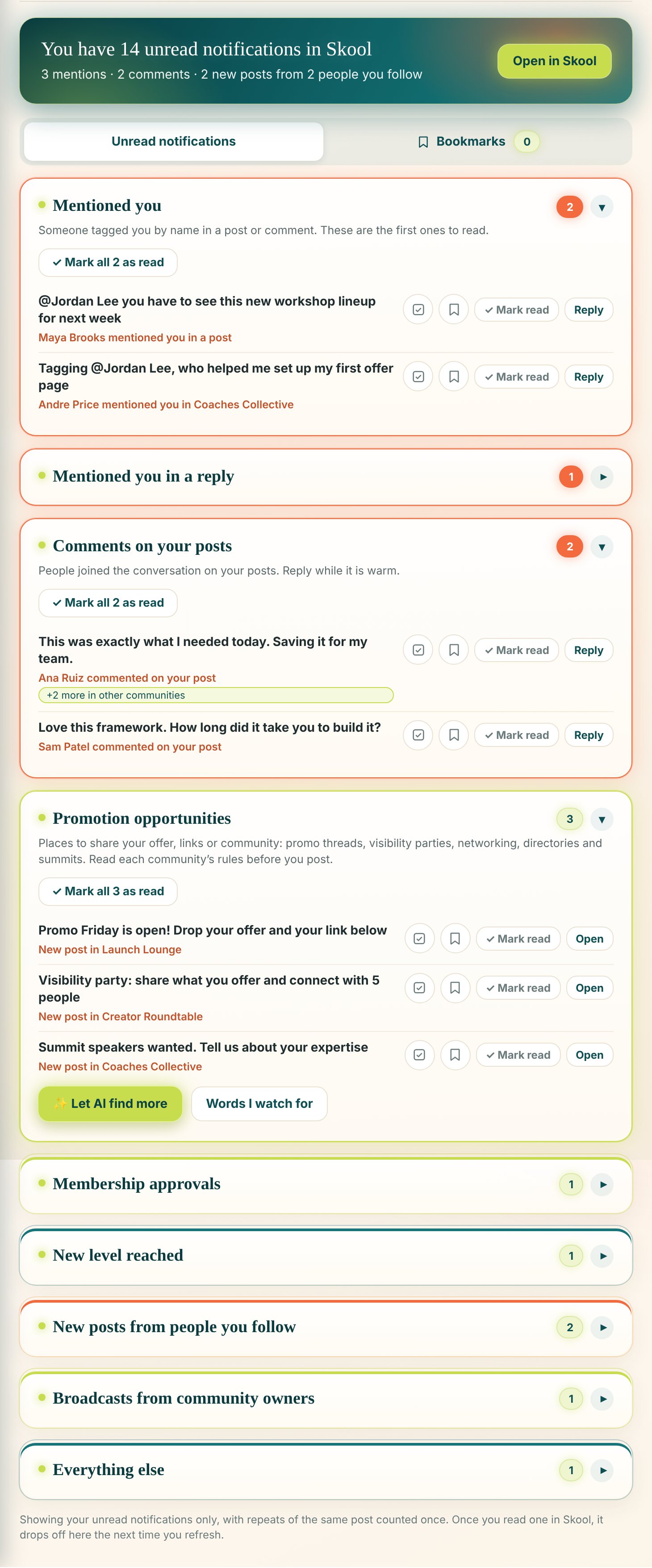
Keep every notification. Spend far less time on them.
No more turning notifications off just to get your day back. Flight Plan sorts your Skool notifications by type, so you can work through them quickly in Flight Plan instead of scrolling the Skool bell one by one.
- Mentions, comments, approvals and new levels each in their own box
- Repeats of the same post shown once
- Promotion opportunities pulled out for you, so you never miss a place to share
- Mark everything read in one click, and Skool's bell matches
- Every unread notification brought in, matching Skool's own unread count

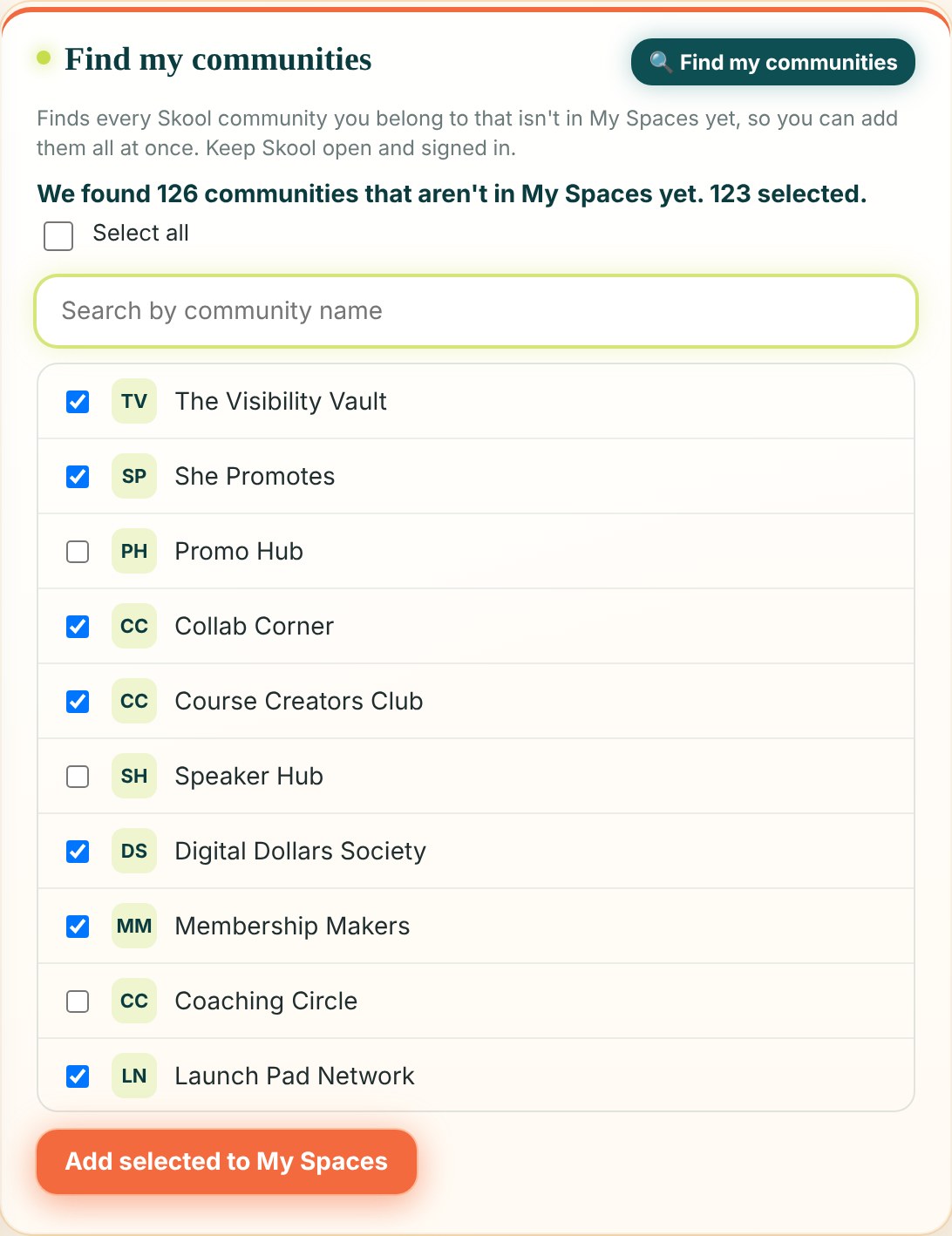
Find every community in one click
Belong to dozens of Skool communities? Flight Plan finds every one you belong to and adds the ones you choose to My Spaces, categories and all. No more adding them one at a time.
- Every community you belong to, found for you
- Select all, or pick just the ones you want
- Names and categories filled in automatically
- Joined a new community? One click finds it
- Free holds 10 communities. Pro and Pro + AI hold as many as you like
Every community you promote in, organized
If you share in a lot of Skool communities, keeping track of where and when you can promote is a job in itself. My Spaces keeps it all in one place.
- Find every community you belong to and add them all at once, with their categories filled in for you
- Set each community's default category, promo days and rules to remember
- Every day, your Dashboard lists the communities where you can promote, based on the promo days and rules you saved
- Pick your communities in one click when you share a post, or let Post Where I Can Today pick them for you
- See when you last posted in each community, with a warning before you go over its daily limit
- Keep Out: words or links you never want posted in a community
- Skool Community Finder: search Skool for communities to promote in, network with or learn from, then review them now, save them for later or set them aside as Not a fit
- A Plans button on every Skool community page, so your membership level is one click away
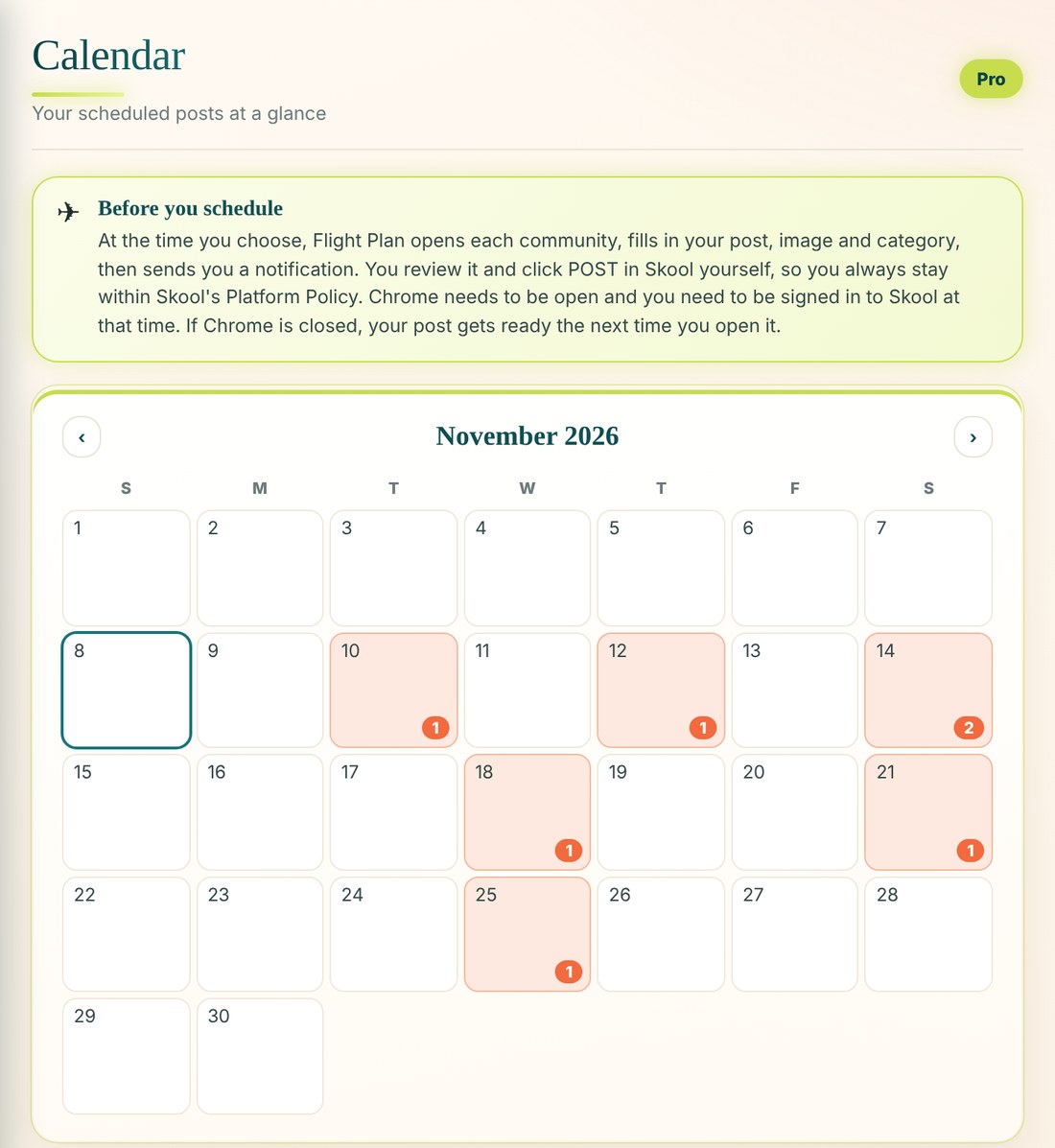
Plan your week on the Calendar
Schedule posts ahead and see them all on your Calendar. At the time you pick, Flight Plan reminds you to click POST, or posts it for you.
- Calendar view of every scheduled post
- Repeating posts and drafts you can schedule later
- Unlimited communities and saved posts you can reuse
- Top Posts: every post ranked by likes and comments
- Waiting on you: every comment on your posts you haven't answered yet
- Your top time of day, best communities and average likes and comments per post
- Give Back tracker, with a reminder to give back first when a community asks you to before you promote
- 12 months of activity history
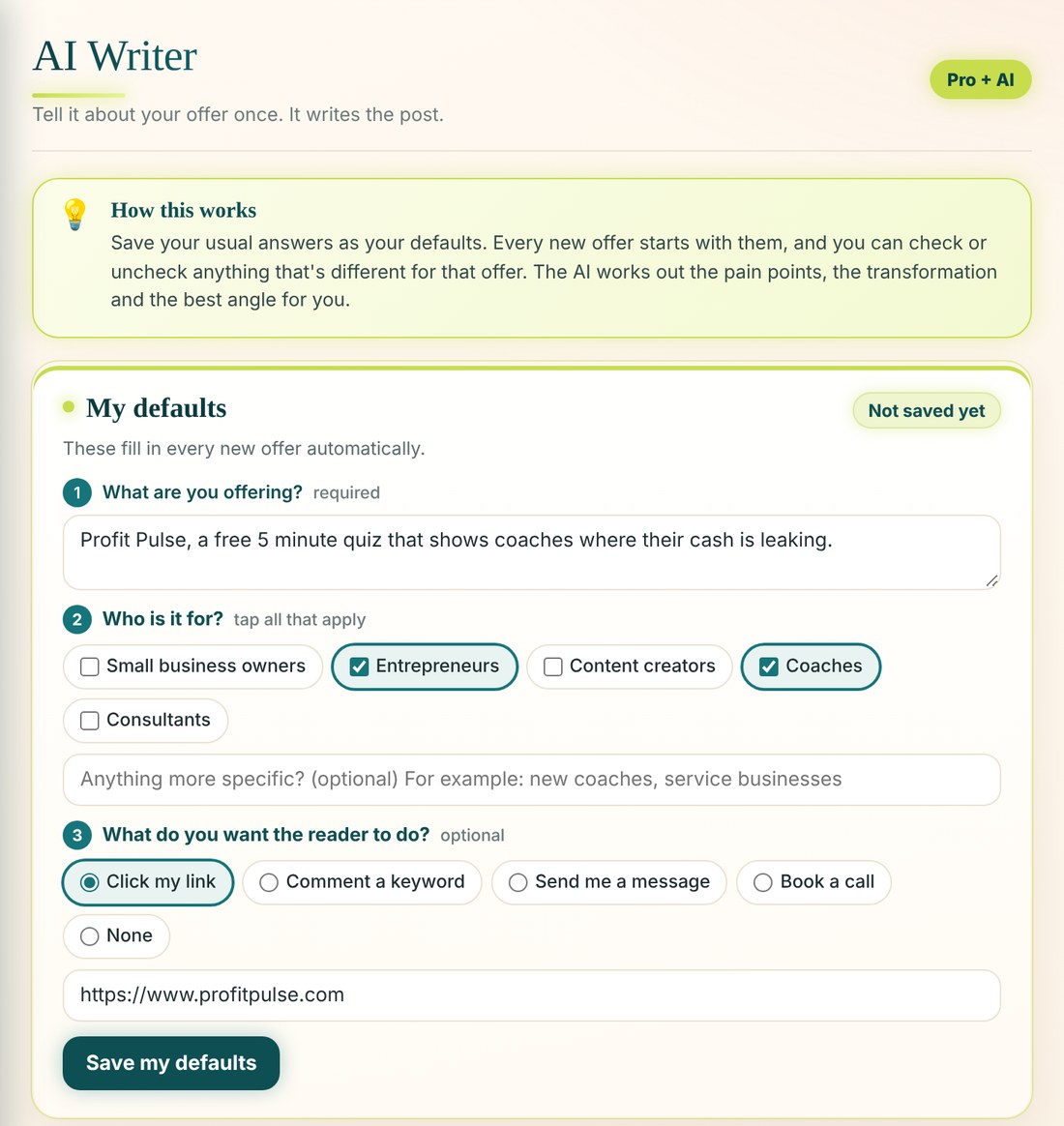
An AI Writer built on sales psychology
This isn't a generic AI. Our AI Writer is built on sales psychology: how buyers think, what makes them stop scrolling and what moves them to say yes. Tell it about your offer once, and it writes the hook, the post and your call to action.
- Hooks that stop the scroll and name the pain your reader feels
- A post that speaks to one real struggle and the transformation your offer brings
- A clear call to action with honest urgency, never hype
- Three title options to choose your favorite from
- Write 5 Versions, each from a different angle
- Improve With AI makes your own draft stronger, in your voice
- Emojis where they fit (or remove them in one click if you'd rather go emoji-free)
- AI promotion finder spots more chances to share
- Post insights: what people are saying, questions to answer, why your top posts worked and what to post next
- Reply With AI on comments waiting for you, with two options to choose from
- Read rules finds each community's give-back rules for you
We never ask for your
Skool login credentials
Flight Plan works inside your own Chrome browser, beside the Skool site you are already signed in to, or on its own tab. Your Skool username and password are never collected, stored or sent to any server, and Flight Plan never signs in to Skool for you. Your communities, drafts and tasks stay on your computer.
Every post is yours. Always.
Skool is built for real people showing up authentically and engaging with their audience. Flight Plan was built around that. It gives you your time back by taking the busywork of posting to every community off your plate, while every decision stays with you.
Every post is written in your voice and approved by you. Click POST yourself, or let Post It For Me post it at the time you choose. No one ever signs in to Skool on your behalf, and we will never ask for your Skool login credentials.
- You review every postFlight Plan fills it in. You read it, adjust it and decide.
- You approve every postNothing goes out without your approval. You stay in control of what is shared.
- You reply as yourselfNotifications and messages open in Skool, so every reply is personal.
- Built to respect Skool's rulesFlight Plan works inside your own browser alongside Skool or on its own tab, the way Skool intends people to show up.
Start free. Upgrade when you are ready.
Monthly plans with no contract. Cancel anytime from Settings.
Free
- Post to up to 10 communities
- Sorted notifications
- My Spaces with promo days
- Post Again from your Activity
- Optional Post It For Me
- Up to 10 images, video links and polls in your posts
- 2 Skool Community Finder scans each month
- Plus much more!
No credit card needed. Upgrade anytime from inside Flight Plan.
Pro
- Everything in Free
- Unlimited communities, found and added in one click
- Schedule posts, with repeats and drafts
- Save your posts and share them again
- Top Posts: likes and comments on your posts, ranked
- Waiting on you: comments you haven't answered yet
- 4 Skool Community Finder scans each month
- Plus much more!
Monthly plan with no contract. Cancel anytime from Settings.
Pro + AI
- Everything in Pro
- AI Writer built on sales psychology, with 300 AI credits a month
- Write 5 Versions of a post, each from a different angle
- Improve and Reply With AI, in your voice
- My Writing Samples, so the AI Writer matches your voice
- Rules Reader: promo rules from each community's own pages
- No-fly zones keep products out of chosen communities
- Post insights on your top posts
- 8 Skool Community Finder scans each month
- Plus much more!
Install the free extension first, then upgrade anytime from inside Flight Plan. A confirmed email is required on every plan.
Every plan includes posting to one community you own, and additional owned communities can be added if needed. Each paid plan covers one Skool login. Use a second Skool login? Add it for $9 a month. Pro + AI includes 300 AI credits each month, and more can be added if needed. Some Review links in the Skool Community Finder are affiliate links, and SkoolSocial may receive a small commission for referring you, at no extra cost to you.
Give your posts a flight plan
Write once, share to every community and keep your follow ups on track, all in one place.
Add to Chrome, it's free